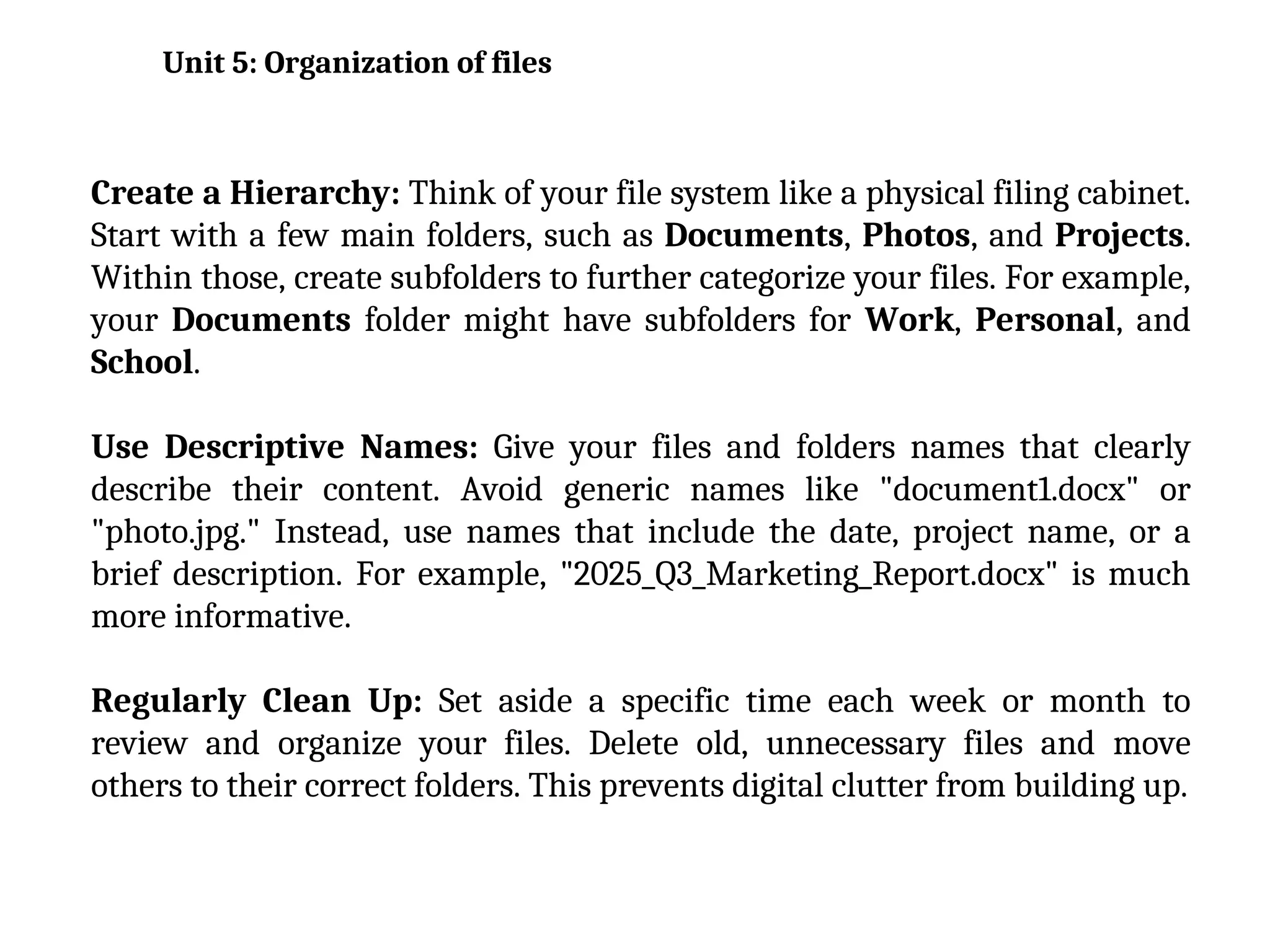
Create a Hierarchy: Think of your file system like a physical filing cabinet.
Start with a few main folders, such as Documents, Photos, and Projects.
Within those, create subfolders to further categorize your files. For example,
your Documents folder might have subfolders for Work, Personal, and
School.
Use Descriptive Names: Give your files and folders names that clearly
describe their content. Avoid generic names like "document1.docx" or
"photo.jpg." Instead, use names that include the date, project name, or a
brief description. For example, "2025_Q3_Marketing_Report.docx" is much
more informative.
Regularly Clean Up: Set aside a specific time each week or month to
review and organize your files. Delete old, unnecessary files and move
others to their correct folders. This prevents digital clutter from building up.
Unit 5: Organization of files
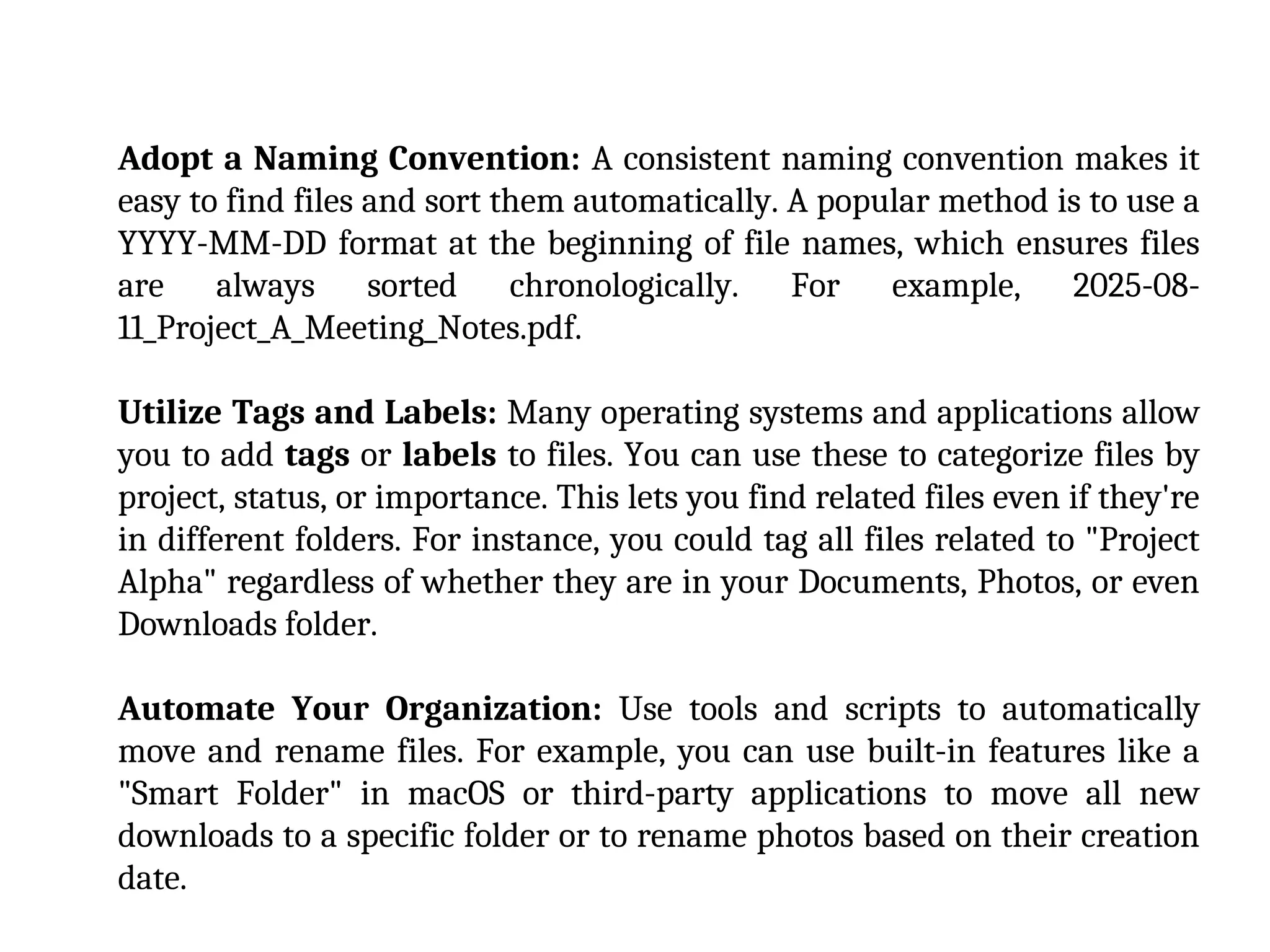
Adopt a Naming Convention: A consistent naming convention makes it
easy to find files and sort them automatically. A popular method is to use a
YYYY-MM-DD format at the beginning of file names, which ensures files
are always sorted chronologically. For example, 2025-08-
11_Project_A_Meeting_Notes.pdf.
Utilize Tags and Labels: Many operating systems and applications allow
you to add tags or labels to files. You can use these to categorize files by
project, status, or importance. This lets you find related files even if they're
in different folders. For instance, you could tag all files related to "Project
Alpha" regardless of whether they are in your Documents, Photos, or even
Downloads folder.
Automate Your Organization: Use tools and scripts to automatically
move and rename files. For example, you can use built-in features like a
"Smart Folder" in macOS or third-party applications to move all new
downloads to a specific folder or to rename photos based on their creation
date.
Data Redundancy and Inconsistency
Data redundancy is a major issue, where the same
data is stored in multiple files across different
departments. For example, a student's address might
be in a file for the registrar's office, another for the
bursar's office, and a third for the library. This wastes
storage space and, more importantly, leads to data
inconsistency. If the student's address is updated in
one file but not the others, there are now conflicting
versions of the same data, making it impossible to
know which one is correct.
Problem with Traditional File environment
Program-Data Dependence
In a traditional file environment, the structure of the
data files is tightly linked to the specific application
programs that use them. This is known as program-
data dependence. If the format of a file changes (e.g.,
a new field is added), all the programs that access that
file must be modified and recompiled. This makes
maintenance difficult, time-consuming, and expensive.
Lack of Flexibility and Data Sharing
Because each application has its own set of files, it is
difficult to share data across different departments.
Generating an ad-hoc report that requires data from
multiple files can be a complex and time-consuming
task, often requiring a new program to be written. The
system lacks the flexibility to easily respond to new
information requests or combine data in new ways.
Poor Security and Data Control
Traditional file systems offer limited control over
data access and security. There is often no
centralized authority to manage who can view,
modify, or delete data. This makes it difficult to
enforce security policies and track changes,
increasing the risk of data breaches and
corruption.
A Database Management System (DBMS) is a
software system that allows users to create,
define, maintain, and manage databases. It
acts as an intermediary between the user or
application programs and the physical
database files, providing a structured and
secure environment for data storage and
retrieval.
Key Capabilities of a DBMS
Data Definition: A DBMS allows you to define the
schema, or logical structure, of the database. This
includes specifying data types, relationships
between tables, and constraints (rules) that govern
the data. Using a Data Definition Language
(DDL), you can create, modify, and delete the
database structure itself.
Data Manipulation: This is the core function of
a DBMS, enabling you to interact with the data.
A Data Manipulation Language (DML), such
as SQL, provides commands for:
•Retrieving data: Queries to fetch specific
information from the database.
•Inserting data: Adding new records.
•Updating data: Modifying existing records.
•Deleting data: Removing records from the
database.
Data Integrity: A DBMS enforces rules to maintain
the quality and consistency of data. It ensures that
the data is accurate and reliable. This is achieved
through various constraints, such as:
•Primary keys that uniquely identify records.
•Foreign keys that enforce relationships between
different tables.
•Check constraints that validate data values.
•Data consistency is a crucial aspect of this,
preventing conflicting or illogical data from being
stored.
Data Security: A DBMS provides mechanisms to
protect data from unauthorized access. This
includes:
•User authentication and authorization, which
grant different levels of access rights (e.g., read-
only, read-write) to different users.
•Encryption of data to protect it from being read
if the underlying files are compromised.
Concurrency Control: In a multi-user
environment, a DBMS manages simultaneous
access to the database to prevent data
inconsistencies. For example, if two users try
to update the same record at the same time,
the DBMS ensures that one user's changes
don't overwrite the other's without a proper
resolution.
Designing databases involves creating a structured plan for how
data will be stored, organized, and managed. The goal is to
ensure the database is efficient, reliable, and easy to maintain.
This process typically follows several key steps.
Designing Database
Conceptual Design
This is the first step and focuses on understanding the data requirements of
the system without considering specific technical details. It involves:
Identifying entities: These are the main objects or concepts about which data
will be stored (e.g., Students, Courses, Instructors).
Defining attributes: These are the properties or characteristics of each entity
(e.g., a Student entity might have attributes like StudentID, Name,
DateOfBirth).
Establishing relationships: This step identifies how entities are connected to
each other (e.g., a Student enrolls in a Course).
The result of this phase is often a high-level Entity-Relationship (ER) diagram ,
which visually represents the entities, their attributes, and their relationships.
Logical Design
The logical design phase translates the conceptual model into a more detailed,
platform-independent structure. This is where you formalize the
relationships and apply normalization.
Mapping ER diagrams: The entities, attributes, and relationships from the
conceptual model are converted into a relational schema. Entities become
tables, attributes become columns, and relationships are often represented by
foreign keys.
Normalization: This is a crucial process for minimizing data redundancy
and improving data integrity. It involves a series of rules, known as normal
forms (e.g., First Normal Form, Second Normal Form, Third Normal Form),
that help to organize columns and tables efficiently. For example, a table is in
Third Normal Form if all its columns depend only on the primary key and not
on any other non-key columns.
Physical Design
This is the final stage, where the logical design is implemented on a specific
database management system (DBMS) such as MySQL, PostgreSQL, or Oracle.
Choosing data types: You select the appropriate data types for each column
(e.g., INTEGER for a student ID, VARCHAR for a name).
Defining indexes: Indexes are special data structures that speed up data
retrieval operations. You decide which columns to index to optimize query
performance.
Specifying constraints: Constraints are rules that enforce data integrity
(e.g., a NOT NULL constraint to ensure a column always has a value, or a
UNIQUE constraint to prevent duplicate values).
Considering storage and performance: This step involves making
decisions about physical storage structures, partitioning, and other
performance-related configurations based on the specific DBMS being used.
Nonrelational databases
It is called NoSQL databases, are a type of database that doesn't use
the traditional tabular schema of rows and columns found in
relational databases. Instead, they use a variety of flexible data
models to store and retrieve data. This approach is ideal for
handling large volumes of unstructured or semi-structured data,
and it offers significant advantages in scalability and performance
for certain applications.
Features
Flexible Schema: Unlike a relational database, which requires a predefined
schema, NoSQL databases have a dynamic schema. This means you don't need to
define the structure of your data before you start storing it. You can easily add
new fields or change data types, which is perfect for agile development and
applications with evolving data requirements.
High Performance: NoSQL databases are optimized for fast read and write
operations, especially with large datasets. They avoid the complex joins and data
transformations often required in relational databases, which can significantly
speed up query times.
High Availability: Many NoSQL databases are designed with a distributed
architecture, meaning they have no single point of failure. Data can be replicated
across multiple servers, making the system more resilient to unplanned outages.
Types of Nonrelational Databases
There are four primary types of nonrelational databases, each with a unique data
model and specific use cases.
1. Key-Value Stores
This is the simplest type of NoSQL database. Data is stored as a collection of key-
value pairs, similar to a dictionary or hash map. Each unique key is associated
with a specific value.
Use Cases: Caching, session management, user profiles, and shopping cart data.
Examples: Redis, Amazon DynamoDB, Memcached.
2.Document Databases
Document databases store data in flexible, semi-structured
formats called documents. These documents, often in JSON, XML,
or BSON format, can contain a variety of nested data types and
don't need to have the same structure.
Use Cases: Content management systems, product catalogs,
blogging platforms, and user data.
Examples: MongoDB, CouchDB, Amazon DocumentDB.
3. Wide-Column Stores
These databases are organized as a set of columns, with data
stored in rows. While they look similar to relational tables, the
columns and their formatting can vary from row to row, allowing
for massive scalability. They are highly optimized for handling
large-scale data with high write and read demands.
Use Cases: Big data analytics, time-series data, and IoT
applications.
Examples: Apache Cassandra, Google Bigtable, HBase.
4. Graph Databases
Graph databases store data using a graph structure of nodes
(representing entities) and edges (representing the relationships
between the entities). Both nodes and edges can have properties.
This model is exceptionally good at managing complex
relationships between data.
Use Cases: Social networks, fraud detection, and
recommendation engines.
Examples: Neo4j, Amazon Neptune, ArangoDB.
Cloud database
A cloud database is a database service built to run on a public or
hybrid cloud computing platform.Unlike a traditional on-premises
database where you own and manage all the hardware and
software, a cloud database is hosted and maintained by a cloud
service provider, and you access it over the internet.
Benefits of Cloud Databases
Scalability: Cloud databases are highly scalable. They can quickly
and automatically scale up to handle increased demand or scale
down to reduce costs during low-traffic periods. This is known as
elasticity
Cost-Effectiveness: With a pay-as-you-go model, you only pay for
the resources you consume.This eliminates the need for expensive
hardware purchases and the associated costs of power, cooling, and
physical space.
High Availability and Disaster Recovery: Cloud providers
distribute data across multiple data centers and provide automatic
backups and failover mechanisms. This ensures your data is always
available and can be quickly restored in case of a disaster or outage.
Managed Services: In many cases, cloud databases are offered as a
Database-as-a-Service (DBaaS). The provider handles all the
administrative tasks, such as patching, security updates, and
performance tuning, freeing up your internal IT team.
Types of Cloud Databases
Cloud databases are not a single technology; they are offered in various forms to
suit different needs:
Relational Databases: These are the classic databases that use a structured
schema of tables, rows, and columns. They are ideal for applications requiring
strong consistency and complex querying with SQL (Structured Query
Language). Examples include MySQL, PostgreSQL, and Microsoft SQL Server, all
offered as managed services by cloud providers.
Nonrelational (NoSQL) Databases: For applications dealing with large
volumes of unstructured or semi-structured data, NoSQL databases are a great
fit. They provide flexible schemas and are optimized for horizontal scalability.
Common types include key-value stores, document databases, and wide-column
stores.
Cloud Data Warehouses: These are large-scale, highly scalable
databases designed specifically for analytical processing and
business intelligence. They allow organizations to store vast
amounts of historical data from multiple sources and run complex
queries for insights.
In-Memory Databases: These databases store data in a computer's
main memory (RAM) instead of on a disk. This allows for extremely
fast data access and is perfect for real-time applications like caching
and session management.
Cloud Database Providers
Some of the leading providers and their key offerings include:
Amazon Web Services (AWS): Offers a comprehensive suite of databases,
including Amazon RDS (for relational databases), Amazon DynamoDB (a fully
managed NoSQL service), and Amazon Redshift (a cloud data warehouse).
Microsoft Azure: Provides services like Azure SQL Database (for relational data),
Azure Cosmos DB (a globally distributed, multi-model NoSQL database), and Azure
Synapse Analytics (a data warehouse).
Google Cloud Platform (GCP): Offers Cloud SQL (for managed relational
databases), Cloud Firestore (a NoSQL document database), and BigQuery (a
serverless, highly scalable data warehouse).
Blockchain
Blockchain is a distributed digital ledger technology that enables the secure,
transparent, and permanent recording of transactions and data. Think of it as a
shared, unchangeable database distributed across many computers (nodes) in a
network.
How It Works
Transactions are recorded in blocks: When a new transaction occurs, it is
verified and bundled together with other new transactions into a "block" of data.
Consensus is reached: Before a new block is added to the chain, the majority of
participants on the network must agree that the transaction is valid. This is done
through a consensus mechanism, such as Proof-of-Work (PoW) or Proof-of-Stake
(PoS).
Blocks are linked and secured: Once consensus is reached, the block is
cryptographically linked to the previous block in the chain using a unique digital
fingerprint called a hash. This creates a chronological and secure chain of data.
Any attempt to alter a block would change its hash, and thus break the chain,
making it immediately detectable.
The ledger is shared: The newly validated block is then broadcast to all the
participants in the network, and each one gets an updated copy of the entire
ledger.
This process ensures that the data is immutable (cannot be changed), transparent
(everyone on the network can see the ledger), and decentralized (no single entity
controls the network).
Features
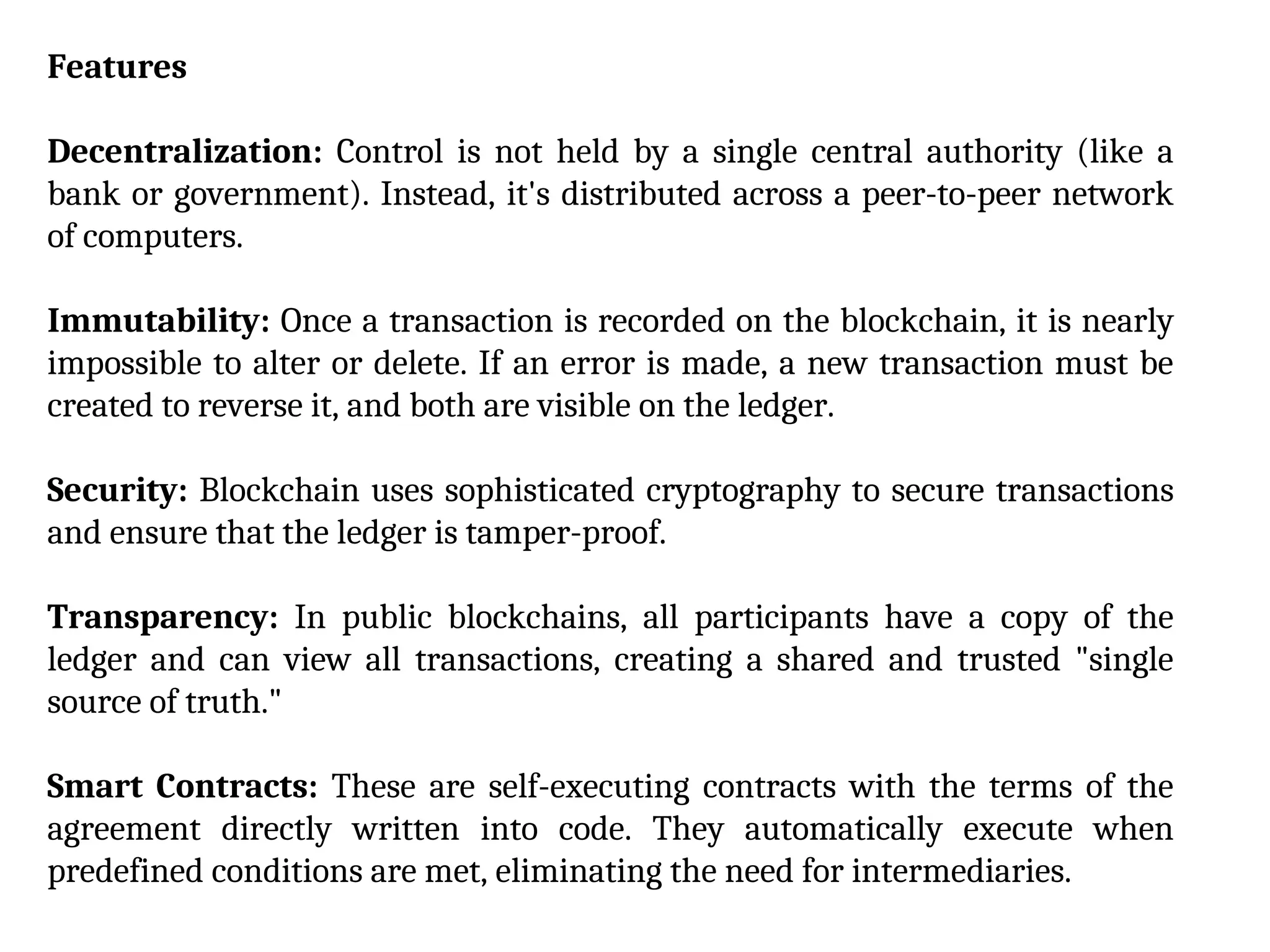
Decentralization: Control is not held by a single central authority (like a
bank or government). Instead, it's distributed across a peer-to-peer network
of computers.
Immutability: Once a transaction is recorded on the blockchain, it is nearly
impossible to alter or delete. If an error is made, a new transaction must be
created to reverse it, and both are visible on the ledger.
Security: Blockchain uses sophisticated cryptography to secure transactions
and ensure that the ledger is tamper-proof.
Transparency: In public blockchains, all participants have a copy of the
ledger and can view all transactions, creating a shared and trusted "single
source of truth."
Smart Contracts: These are self-executing contracts with the terms of the
agreement directly written into code. They automatically execute when
predefined conditions are met, eliminating the need for intermediaries.
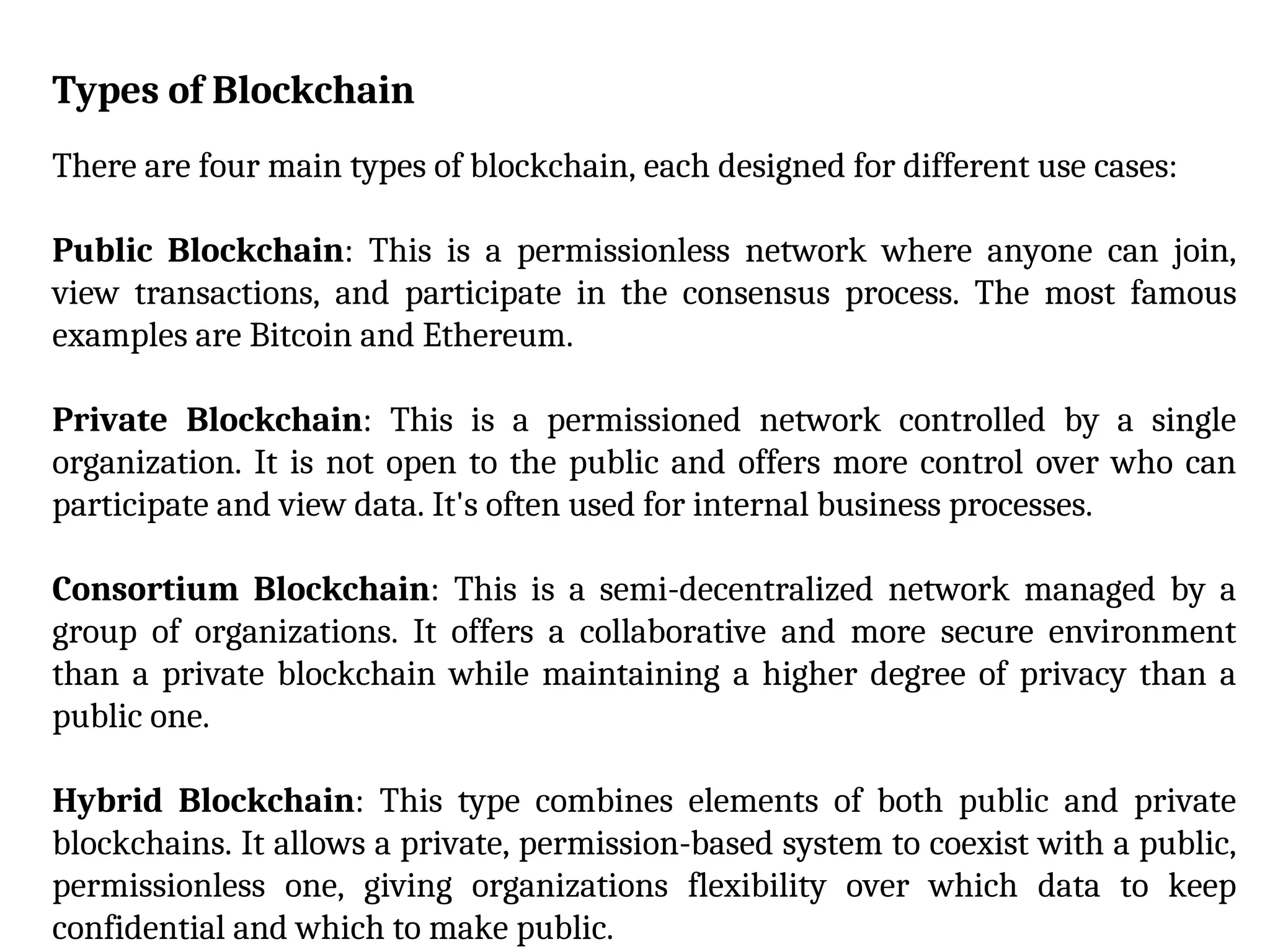
Types of Blockchain
There are four main types of blockchain, each designed for different use cases:
Public Blockchain: This is a permissionless network where anyone can join,
view transactions, and participate in the consensus process. The most famous
examples are Bitcoin and Ethereum.
Private Blockchain: This is a permissioned network controlled by a single
organization. It is not open to the public and offers more control over who can
participate and view data. It's often used for internal business processes.
Consortium Blockchain: This is a semi-decentralized network managed by a
group of organizations. It offers a collaborative and more secure environment
than a private blockchain while maintaining a higher degree of privacy than a
public one.
Hybrid Blockchain: This type combines elements of both public and private
blockchains. It allows a private, permission-based system to coexist with a public,
permissionless one, giving organizations flexibility over which data to keep
confidential and which to make public.
Applications of Blockchain
While initially created for cryptocurrencies like Bitcoin, blockchain's potential
extends far beyond digital money. Its applications are being explored and
developed across numerous industries:
Financial Services: Faster and cheaper cross-border payments, fraud detection,
and asset management.
Supply Chain Management: Tracking goods from origin to destination,
ensuring product authenticity, and improving transparency.
Healthcare: Securely storing and sharing patient medical records, managing
clinical trial data, and preventing counterfeit drugs.
Voting: Creating secure, transparent, and tamper-proof voting systems to
enhance election integrity.
Intellectual Property: Proving ownership and managing royalties for digital
assets like art (through NFTs) and music.
Government: Creating secure digital identities, land registries, and other public
records.
Tools and Technologies to improve Business Performance and
Decision Making
1. Data and Analytics
Business Intelligence (BI) and Business Analytics (BA): These are
foundational for data-driven decision-making. BI focuses on descriptive
analytics, helping you understand what has happened in the past and what
is currently happening. It uses tools like dashboards, reporting software, and
data visualization to provide a snapshot of key performance indicators
(KPIs) and business metrics. BA, on the other hand, is more future-focused,
using predictive and prescriptive analytics to forecast trends and
recommend actions.
Data Mining and Predictive Analytics: These technologies use statistical
models and machine learning to find patterns and trends in large datasets.
This allows businesses to predict future outcomes, understand customer
behavior, and proactively address potential issues.
Real-time Analytics: This involves processing data as it comes in, enabling
businesses to make immediate decisions based on current information. This is
particularly valuable for industries like finance and retail where quick responses
to market changes are crucial.
2. Automation and AI
Artificial Intelligence (AI) and Machine Learning (ML): AI and ML
algorithms analyze vast amounts of data to identify insights and optimize
processes. They can be used for things like customer service chatbots,
personalized marketing, and predictive maintenance in manufacturing.
Robotic Process Automation (RPA): RPA uses software robots to automate
repetitive, rule-based tasks such as data entry and processing. This frees up
human employees to focus on more strategic, high-value work, increasing overall
efficiency and accuracy.
Decision Automation: This encompasses systems that make decisions based on
pre-defined criteria or algorithms without human intervention. This can be used
for things like automatically approving loans or managing inventory levels.
3. Strategic Frameworks and Tools
While not strictly technology, these traditional tools are often integrated into
modern software platforms to guide decision-making.
SWOT Analysis: A framework for evaluating an organization's internal
Strengths and Weaknesses, and external Opportunities and Threats.
Decision Matrix: A structured tool used to evaluate and prioritize multiple
alternatives based on predefined criteria.
Cost-Benefit Analysis: A method for comparing the financial costs of a
decision against its potential benefits.
Decision Trees: A graphical tool that maps out different decision paths and
their possible outcomes, helping to visualize complex scenarios.
Big data
Big data refers to extremely large and diverse collections of structured,
unstructured, and semi-structured data that are too large and complex to be
processed and managed with traditional data-processing software. Big data is
often characterized by the 3 V's:
Volume: The massive amount of data being generated, often in petabytes or
even exabytes.
Velocity: The speed at which data is being generated and needs to be processed,
often in real-time.
Variety: The diversity of data types, including structured data (like a database),
semi-structured data (like a web log), and unstructured data (like video, images,
or social media posts).
Challenges of Big Data
Data Management & Infrastructure
Storage and Scalability: The sheer volume of data requires a scalable and cost-
effective storage solution. Traditional databases often can't handle the scale and
diversity of big data, leading to the need for distributed storage systems like
Hadoop.
Data Integration: Data comes from many different sources and formats,
making it difficult to combine and analyze. Integrating these disparate data
sources into a cohesive system is a complex and time-consuming process.
Data Quality & Governance
Veracity: The quality and accuracy of big data can be a major issue. Data can be
messy, noisy, and error-prone, which can lead to flawed analysis and poor
decision-making. Ensuring data quality is critical but challenging at a massive
scale.
Lack of Data Governance: Without clear policies and procedures for managing
data, organizations can face inconsistency, security risks, and regulatory
violations. Establishing and enforcing data governance across a large and varied
dataset is difficult.
Analytics & Processing
Real-time Analytics: The velocity of data generation means that
organizations often need to process and analyze data in real-time to get timely
insights. This requires sophisticated systems and a robust infrastructure that
can handle high-speed data streams.
Security & Privacy
Security Concerns: Big data stores are high-value targets for attackers
because they often contain sensitive business and customer information.
Implementing comprehensive security policies across a diverse and complex
dataset is difficult.
Privacy and Compliance: Organizations must ensure that data collection
and storage practices comply with various data privacy and regulatory
requirements, such as GDPR(General Data Protection Regulation, is a
European Union law focused on data privacy and security) or HIPAA( Health
Insurance Portability and Accountability Act, is a US federal law). This is a
tricky task given the scale and variety of the data.
Unit 5 contents for subject 1 and subject 3

  • 1.
    Create a Hierarchy:Think of your file system like a physical filing cabinet. Start with a few main folders, such as Documents, Photos, and Projects. Within those, create subfolders to further categorize your files. For example, your Documents folder might have subfolders for Work, Personal, and School. Use Descriptive Names: Give your files and folders names that clearly describe their content. Avoid generic names like "document1.docx" or "photo.jpg." Instead, use names that include the date, project name, or a brief description. For example, "2025_Q3_Marketing_Report.docx" is much more informative. Regularly Clean Up: Set aside a specific time each week or month to review and organize your files. Delete old, unnecessary files and move others to their correct folders. This prevents digital clutter from building up. Unit 5: Organization of files
  • 2.
    Adopt a NamingConvention: A consistent naming convention makes it easy to find files and sort them automatically. A popular method is to use a YYYY-MM-DD format at the beginning of file names, which ensures files are always sorted chronologically. For example, 2025-08- 11_Project_A_Meeting_Notes.pdf. Utilize Tags and Labels: Many operating systems and applications allow you to add tags or labels to files. You can use these to categorize files by project, status, or importance. This lets you find related files even if they're in different folders. For instance, you could tag all files related to "Project Alpha" regardless of whether they are in your Documents, Photos, or even Downloads folder. Automate Your Organization: Use tools and scripts to automatically move and rename files. For example, you can use built-in features like a "Smart Folder" in macOS or third-party applications to move all new downloads to a specific folder or to rename photos based on their creation date.
  • 3.
    Data Redundancy andInconsistency Data redundancy is a major issue, where the same data is stored in multiple files across different departments. For example, a student's address might be in a file for the registrar's office, another for the bursar's office, and a third for the library. This wastes storage space and, more importantly, leads to data inconsistency. If the student's address is updated in one file but not the others, there are now conflicting versions of the same data, making it impossible to know which one is correct. Problem with Traditional File environment
  • 4.
    Program-Data Dependence In atraditional file environment, the structure of the data files is tightly linked to the specific application programs that use them. This is known as program- data dependence. If the format of a file changes (e.g., a new field is added), all the programs that access that file must be modified and recompiled. This makes maintenance difficult, time-consuming, and expensive.
  • 5.
    Lack of Flexibilityand Data Sharing Because each application has its own set of files, it is difficult to share data across different departments. Generating an ad-hoc report that requires data from multiple files can be a complex and time-consuming task, often requiring a new program to be written. The system lacks the flexibility to easily respond to new information requests or combine data in new ways.
  • 6.
    Poor Security andData Control Traditional file systems offer limited control over data access and security. There is often no centralized authority to manage who can view, modify, or delete data. This makes it difficult to enforce security policies and track changes, increasing the risk of data breaches and corruption.
  • 7.
    A Database ManagementSystem (DBMS) is a software system that allows users to create, define, maintain, and manage databases. It acts as an intermediary between the user or application programs and the physical database files, providing a structured and secure environment for data storage and retrieval.
  • 8.
    Key Capabilities ofa DBMS Data Definition: A DBMS allows you to define the schema, or logical structure, of the database. This includes specifying data types, relationships between tables, and constraints (rules) that govern the data. Using a Data Definition Language (DDL), you can create, modify, and delete the database structure itself.
  • 9.
    Data Manipulation: Thisis the core function of a DBMS, enabling you to interact with the data. A Data Manipulation Language (DML), such as SQL, provides commands for: •Retrieving data: Queries to fetch specific information from the database. •Inserting data: Adding new records. •Updating data: Modifying existing records. •Deleting data: Removing records from the database.
  • 10.
    Data Integrity: ADBMS enforces rules to maintain the quality and consistency of data. It ensures that the data is accurate and reliable. This is achieved through various constraints, such as: •Primary keys that uniquely identify records. •Foreign keys that enforce relationships between different tables. •Check constraints that validate data values. •Data consistency is a crucial aspect of this, preventing conflicting or illogical data from being stored.
  • 11.
    Data Security: ADBMS provides mechanisms to protect data from unauthorized access. This includes: •User authentication and authorization, which grant different levels of access rights (e.g., read- only, read-write) to different users. •Encryption of data to protect it from being read if the underlying files are compromised.
  • 12.
    Concurrency Control: Ina multi-user environment, a DBMS manages simultaneous access to the database to prevent data inconsistencies. For example, if two users try to update the same record at the same time, the DBMS ensures that one user's changes don't overwrite the other's without a proper resolution.
  • 13.
    Designing databases involvescreating a structured plan for how data will be stored, organized, and managed. The goal is to ensure the database is efficient, reliable, and easy to maintain. This process typically follows several key steps. Designing Database
  • 14.
    Conceptual Design This isthe first step and focuses on understanding the data requirements of the system without considering specific technical details. It involves: Identifying entities: These are the main objects or concepts about which data will be stored (e.g., Students, Courses, Instructors). Defining attributes: These are the properties or characteristics of each entity (e.g., a Student entity might have attributes like StudentID, Name, DateOfBirth). Establishing relationships: This step identifies how entities are connected to each other (e.g., a Student enrolls in a Course). The result of this phase is often a high-level Entity-Relationship (ER) diagram , which visually represents the entities, their attributes, and their relationships.
  • 15.
    Logical Design The logicaldesign phase translates the conceptual model into a more detailed, platform-independent structure. This is where you formalize the relationships and apply normalization. Mapping ER diagrams: The entities, attributes, and relationships from the conceptual model are converted into a relational schema. Entities become tables, attributes become columns, and relationships are often represented by foreign keys. Normalization: This is a crucial process for minimizing data redundancy and improving data integrity. It involves a series of rules, known as normal forms (e.g., First Normal Form, Second Normal Form, Third Normal Form), that help to organize columns and tables efficiently. For example, a table is in Third Normal Form if all its columns depend only on the primary key and not on any other non-key columns.
  • 16.
    Physical Design This isthe final stage, where the logical design is implemented on a specific database management system (DBMS) such as MySQL, PostgreSQL, or Oracle. Choosing data types: You select the appropriate data types for each column (e.g., INTEGER for a student ID, VARCHAR for a name). Defining indexes: Indexes are special data structures that speed up data retrieval operations. You decide which columns to index to optimize query performance. Specifying constraints: Constraints are rules that enforce data integrity (e.g., a NOT NULL constraint to ensure a column always has a value, or a UNIQUE constraint to prevent duplicate values). Considering storage and performance: This step involves making decisions about physical storage structures, partitioning, and other performance-related configurations based on the specific DBMS being used.
  • 17.
    Nonrelational databases It iscalled NoSQL databases, are a type of database that doesn't use the traditional tabular schema of rows and columns found in relational databases. Instead, they use a variety of flexible data models to store and retrieve data. This approach is ideal for handling large volumes of unstructured or semi-structured data, and it offers significant advantages in scalability and performance for certain applications.
  • 18.
    Features Flexible Schema: Unlikea relational database, which requires a predefined schema, NoSQL databases have a dynamic schema. This means you don't need to define the structure of your data before you start storing it. You can easily add new fields or change data types, which is perfect for agile development and applications with evolving data requirements. High Performance: NoSQL databases are optimized for fast read and write operations, especially with large datasets. They avoid the complex joins and data transformations often required in relational databases, which can significantly speed up query times. High Availability: Many NoSQL databases are designed with a distributed architecture, meaning they have no single point of failure. Data can be replicated across multiple servers, making the system more resilient to unplanned outages.
  • 19.
    Types of NonrelationalDatabases There are four primary types of nonrelational databases, each with a unique data model and specific use cases. 1. Key-Value Stores This is the simplest type of NoSQL database. Data is stored as a collection of key- value pairs, similar to a dictionary or hash map. Each unique key is associated with a specific value. Use Cases: Caching, session management, user profiles, and shopping cart data. Examples: Redis, Amazon DynamoDB, Memcached.
  • 20.
    2.Document Databases Document databasesstore data in flexible, semi-structured formats called documents. These documents, often in JSON, XML, or BSON format, can contain a variety of nested data types and don't need to have the same structure. Use Cases: Content management systems, product catalogs, blogging platforms, and user data. Examples: MongoDB, CouchDB, Amazon DocumentDB.
  • 21.
    3. Wide-Column Stores Thesedatabases are organized as a set of columns, with data stored in rows. While they look similar to relational tables, the columns and their formatting can vary from row to row, allowing for massive scalability. They are highly optimized for handling large-scale data with high write and read demands. Use Cases: Big data analytics, time-series data, and IoT applications. Examples: Apache Cassandra, Google Bigtable, HBase.
  • 22.
    4. Graph Databases Graphdatabases store data using a graph structure of nodes (representing entities) and edges (representing the relationships between the entities). Both nodes and edges can have properties. This model is exceptionally good at managing complex relationships between data. Use Cases: Social networks, fraud detection, and recommendation engines. Examples: Neo4j, Amazon Neptune, ArangoDB.
  • 23.
    Cloud database A clouddatabase is a database service built to run on a public or hybrid cloud computing platform.Unlike a traditional on-premises database where you own and manage all the hardware and software, a cloud database is hosted and maintained by a cloud service provider, and you access it over the internet. Benefits of Cloud Databases Scalability: Cloud databases are highly scalable. They can quickly and automatically scale up to handle increased demand or scale down to reduce costs during low-traffic periods. This is known as elasticity
  • 24.
    Cost-Effectiveness: With apay-as-you-go model, you only pay for the resources you consume.This eliminates the need for expensive hardware purchases and the associated costs of power, cooling, and physical space. High Availability and Disaster Recovery: Cloud providers distribute data across multiple data centers and provide automatic backups and failover mechanisms. This ensures your data is always available and can be quickly restored in case of a disaster or outage. Managed Services: In many cases, cloud databases are offered as a Database-as-a-Service (DBaaS). The provider handles all the administrative tasks, such as patching, security updates, and performance tuning, freeing up your internal IT team.
  • 25.
    Types of CloudDatabases Cloud databases are not a single technology; they are offered in various forms to suit different needs: Relational Databases: These are the classic databases that use a structured schema of tables, rows, and columns. They are ideal for applications requiring strong consistency and complex querying with SQL (Structured Query Language). Examples include MySQL, PostgreSQL, and Microsoft SQL Server, all offered as managed services by cloud providers. Nonrelational (NoSQL) Databases: For applications dealing with large volumes of unstructured or semi-structured data, NoSQL databases are a great fit. They provide flexible schemas and are optimized for horizontal scalability. Common types include key-value stores, document databases, and wide-column stores.
  • 26.
    Cloud Data Warehouses:These are large-scale, highly scalable databases designed specifically for analytical processing and business intelligence. They allow organizations to store vast amounts of historical data from multiple sources and run complex queries for insights. In-Memory Databases: These databases store data in a computer's main memory (RAM) instead of on a disk. This allows for extremely fast data access and is perfect for real-time applications like caching and session management.
  • 27.
    Cloud Database Providers Someof the leading providers and their key offerings include: Amazon Web Services (AWS): Offers a comprehensive suite of databases, including Amazon RDS (for relational databases), Amazon DynamoDB (a fully managed NoSQL service), and Amazon Redshift (a cloud data warehouse). Microsoft Azure: Provides services like Azure SQL Database (for relational data), Azure Cosmos DB (a globally distributed, multi-model NoSQL database), and Azure Synapse Analytics (a data warehouse). Google Cloud Platform (GCP): Offers Cloud SQL (for managed relational databases), Cloud Firestore (a NoSQL document database), and BigQuery (a serverless, highly scalable data warehouse).
  • 28.
    Blockchain Blockchain is adistributed digital ledger technology that enables the secure, transparent, and permanent recording of transactions and data. Think of it as a shared, unchangeable database distributed across many computers (nodes) in a network. How It Works Transactions are recorded in blocks: When a new transaction occurs, it is verified and bundled together with other new transactions into a "block" of data. Consensus is reached: Before a new block is added to the chain, the majority of participants on the network must agree that the transaction is valid. This is done through a consensus mechanism, such as Proof-of-Work (PoW) or Proof-of-Stake (PoS).
  • 29.
    Blocks are linkedand secured: Once consensus is reached, the block is cryptographically linked to the previous block in the chain using a unique digital fingerprint called a hash. This creates a chronological and secure chain of data. Any attempt to alter a block would change its hash, and thus break the chain, making it immediately detectable. The ledger is shared: The newly validated block is then broadcast to all the participants in the network, and each one gets an updated copy of the entire ledger. This process ensures that the data is immutable (cannot be changed), transparent (everyone on the network can see the ledger), and decentralized (no single entity controls the network).
  • 30.
    Features Decentralization: Control isnot held by a single central authority (like a bank or government). Instead, it's distributed across a peer-to-peer network of computers. Immutability: Once a transaction is recorded on the blockchain, it is nearly impossible to alter or delete. If an error is made, a new transaction must be created to reverse it, and both are visible on the ledger. Security: Blockchain uses sophisticated cryptography to secure transactions and ensure that the ledger is tamper-proof. Transparency: In public blockchains, all participants have a copy of the ledger and can view all transactions, creating a shared and trusted "single source of truth." Smart Contracts: These are self-executing contracts with the terms of the agreement directly written into code. They automatically execute when predefined conditions are met, eliminating the need for intermediaries.
  • 31.
    Types of Blockchain Thereare four main types of blockchain, each designed for different use cases: Public Blockchain: This is a permissionless network where anyone can join, view transactions, and participate in the consensus process. The most famous examples are Bitcoin and Ethereum. Private Blockchain: This is a permissioned network controlled by a single organization. It is not open to the public and offers more control over who can participate and view data. It's often used for internal business processes. Consortium Blockchain: This is a semi-decentralized network managed by a group of organizations. It offers a collaborative and more secure environment than a private blockchain while maintaining a higher degree of privacy than a public one. Hybrid Blockchain: This type combines elements of both public and private blockchains. It allows a private, permission-based system to coexist with a public, permissionless one, giving organizations flexibility over which data to keep confidential and which to make public.
  • 32.
    Applications of Blockchain Whileinitially created for cryptocurrencies like Bitcoin, blockchain's potential extends far beyond digital money. Its applications are being explored and developed across numerous industries: Financial Services: Faster and cheaper cross-border payments, fraud detection, and asset management. Supply Chain Management: Tracking goods from origin to destination, ensuring product authenticity, and improving transparency. Healthcare: Securely storing and sharing patient medical records, managing clinical trial data, and preventing counterfeit drugs. Voting: Creating secure, transparent, and tamper-proof voting systems to enhance election integrity. Intellectual Property: Proving ownership and managing royalties for digital assets like art (through NFTs) and music. Government: Creating secure digital identities, land registries, and other public records.
  • 33.
    Tools and Technologiesto improve Business Performance and Decision Making 1. Data and Analytics Business Intelligence (BI) and Business Analytics (BA): These are foundational for data-driven decision-making. BI focuses on descriptive analytics, helping you understand what has happened in the past and what is currently happening. It uses tools like dashboards, reporting software, and data visualization to provide a snapshot of key performance indicators (KPIs) and business metrics. BA, on the other hand, is more future-focused, using predictive and prescriptive analytics to forecast trends and recommend actions. Data Mining and Predictive Analytics: These technologies use statistical models and machine learning to find patterns and trends in large datasets. This allows businesses to predict future outcomes, understand customer behavior, and proactively address potential issues.
  • 34.
    Real-time Analytics: Thisinvolves processing data as it comes in, enabling businesses to make immediate decisions based on current information. This is particularly valuable for industries like finance and retail where quick responses to market changes are crucial. 2. Automation and AI Artificial Intelligence (AI) and Machine Learning (ML): AI and ML algorithms analyze vast amounts of data to identify insights and optimize processes. They can be used for things like customer service chatbots, personalized marketing, and predictive maintenance in manufacturing. Robotic Process Automation (RPA): RPA uses software robots to automate repetitive, rule-based tasks such as data entry and processing. This frees up human employees to focus on more strategic, high-value work, increasing overall efficiency and accuracy. Decision Automation: This encompasses systems that make decisions based on pre-defined criteria or algorithms without human intervention. This can be used for things like automatically approving loans or managing inventory levels.
  • 35.
    3. Strategic Frameworksand Tools While not strictly technology, these traditional tools are often integrated into modern software platforms to guide decision-making. SWOT Analysis: A framework for evaluating an organization's internal Strengths and Weaknesses, and external Opportunities and Threats. Decision Matrix: A structured tool used to evaluate and prioritize multiple alternatives based on predefined criteria. Cost-Benefit Analysis: A method for comparing the financial costs of a decision against its potential benefits. Decision Trees: A graphical tool that maps out different decision paths and their possible outcomes, helping to visualize complex scenarios.
  • 36.
    Big data Big datarefers to extremely large and diverse collections of structured, unstructured, and semi-structured data that are too large and complex to be processed and managed with traditional data-processing software. Big data is often characterized by the 3 V's: Volume: The massive amount of data being generated, often in petabytes or even exabytes. Velocity: The speed at which data is being generated and needs to be processed, often in real-time. Variety: The diversity of data types, including structured data (like a database), semi-structured data (like a web log), and unstructured data (like video, images, or social media posts).
  • 37.
    Challenges of BigData Data Management & Infrastructure Storage and Scalability: The sheer volume of data requires a scalable and cost- effective storage solution. Traditional databases often can't handle the scale and diversity of big data, leading to the need for distributed storage systems like Hadoop. Data Integration: Data comes from many different sources and formats, making it difficult to combine and analyze. Integrating these disparate data sources into a cohesive system is a complex and time-consuming process.
  • 38.
    Data Quality &Governance Veracity: The quality and accuracy of big data can be a major issue. Data can be messy, noisy, and error-prone, which can lead to flawed analysis and poor decision-making. Ensuring data quality is critical but challenging at a massive scale. Lack of Data Governance: Without clear policies and procedures for managing data, organizations can face inconsistency, security risks, and regulatory violations. Establishing and enforcing data governance across a large and varied dataset is difficult.
  • 39.
    Analytics & Processing Real-timeAnalytics: The velocity of data generation means that organizations often need to process and analyze data in real-time to get timely insights. This requires sophisticated systems and a robust infrastructure that can handle high-speed data streams. Security & Privacy Security Concerns: Big data stores are high-value targets for attackers because they often contain sensitive business and customer information. Implementing comprehensive security policies across a diverse and complex dataset is difficult. Privacy and Compliance: Organizations must ensure that data collection and storage practices comply with various data privacy and regulatory requirements, such as GDPR(General Data Protection Regulation, is a European Union law focused on data privacy and security) or HIPAA( Health Insurance Portability and Accountability Act, is a US federal law). This is a tricky task given the scale and variety of the data.